Showing posts with label computer repairs rowville. Show all posts

Wednesday, November 21, 2018

How would you know if your computer needs to be repaired?

In this day and age we consider having computers to be a basic necessity, whether you are a business owner or a regular employee, there are many daily tasks that have to be done with a computer. It has been a significant part of our life to own a computer or a laptop to aid us in our daily tasks. They can be considered as important as having a car because you need it almost everywhere you go – at work or at home.
However, like cars, computers also need to be maintained and repaired. Depending on the problem, your computer may give you a warning that something is not right. You may have not recognized the warning or you may have neglected these signs. Sometimes you don’t get a warning at all, so how would you know if your computers need to be repaired?
Whether your computer is showing signs that it needs to be repaired or not, here are some things to consider:
  1. Physical damage - This is one of the most prominent signs that your computer needs technical attention. Damages such as a broken laptop LCD screen, cracked cases or other abnormal strange noises may signify that the unit has been physically mistreated. If the damage is just cosmetic, the unit may continue to operate without issue, other damage can sometimes lead to more serious technical issues later on.
  2. Running slowly - Slow performance of computers is generally caused by software but in some cases can also be caused by hardware. Other issues could be a lack of available memory or the storage drive is reaching capacity and needs to be cleaned out.
  3. Overheating - All computers have a built in cooling system that usually involves one or more fans that distributes the air throughout the case & central processing unit (CPU) to avoid overheating. However, there are some instances where the cooling system is not functioning properly, fan failure or dust build up can prevent adequate cooling and can lead to premature component failure.
  4. Error messages - If you are receiving error messages, then you must be a reason why. Ignoring messages can lead to bigger problems down the track so it’s best to get them fixed as soon as possible
  5. Infected with malware – Infections can effect computers to varying degrees. Some more minor infections can be detected easily and fixed by an anti-virus software solution. However, there are some viruses that can cause major problems to a computer which, in worst cases, renders them inoperable. 
These are just a few signs that your computer is in danger and needs to be attended to urgently.  Ignoring these warnings may cause severe problems or could even lead to unit replacement. Would you risk having to replace an entire PC due to not getting (what could be) a simple problem fixed?
If your computer needs urgent attention or would just like a service done, CKP Computers is here to help. Please don’t hesitate to give us a call, our number is 0447 619 397 or you can send us an enquiry, either through our contact page, by Facebook or by email, helpme@ckpcomputers.com.au.

Sunday, August 12, 2018

IT Support: Why There is No Room for Computer Problems Today


We are now at the golden age of technology. Nowadays, a computer is considered a basic necessity. It is a powerful device that makes our lives easier. It is also one of the most commonly used mediums worldwide for communication, creating artistic crafts, inputting information and a lot more. Businesses have arrived at an idea of having a paperless office. Thus, the need of efficient and user-friendly computers will is now considered even more important than ever.
There are things that come hand in hand with the trend that computers create. Such as the jobs for computer technicians, starting and building of computer repair shops, an online website that offers IT products and services, and the need for IT experts. Sometimes, these expert people are not tangible persons but an electronic one that can work for you and render services to your company even if they are far away from you. Those are the websites that you can access online. Taking care of your assets will definitely save you a lot of time and money especially if both are running low.
Here’s what an IT support can do for you:
           In businesses, the use computers are considered a mainstream. They are all fan of computers even before the golden era of technology. One of the most important services that a business must have is IT support services. The company should have IT people: a programmer to ensure that their website is always protected; a technician for the hardware maintenance of the computer; and a developer to keep their websites or applications updated.
           It is also important that these people are reliable. You hand them your company assets which is your computers, it must be given that these individuals are reliable at all times. They are the one who handles your clients’ database with confidential information. This is the critical information of the company. It is the golden book of the company so this must be taken care of properly and safely.
           These people are also the one in charge of making sure that all of your files are backed up properly. Files are the most important records of the company and so they must be handled carefully. Retrieving backed up data is very essential when you just had reformatting. IT experts are very good at that.
           Your computer system is one of your assets in your company. It is best that you ensure it is safe from suspicious viruses online. It can really harm your computer system. Computer viruses are getting strong from time to time so asking help from an IT support expert can be the best thing to do.
           Computers can also be useless at times. Without the internet, computers can only do the basics. Enhancing your internet connection and ensuring its speed is also a must thing to do. Your IT support is also the one you can call out for help. They can also ensure that only your company computers and other company portable devices can access your wireless network.
There are lots of common computer problems that only an IT expert can fix. It is necessary that your IT support is skilled and professional so that you can avoid any inconvenience because your computers are being maintained and taken care of. Sometimes when you try to fix your computer yourself, you can do more harm on it than actually repairing it. You can only make the problem worse and it will cost you time and money. Perhaps, an expert IT support service is an answer.
To ensure that everything in your computer system works properly, find out more about our services by visiting https://www.ckpcomputers.com.au.

Monday, July 16, 2018

Benefits of Managed IT Services for small businesses

“Why should I partner with an MSP (Managed Service Provider)?” That’s a question I get asked regularly. Some clients perceive that it would be more economical to stick with the traditional ‘break/fix’ model and to contact the provider only when an issue arises. It’s also a misconception that by being under an IT contract, that’s it’s a form of insurance and only in place if ‘The IT hits the fan’ as it were. In reality it’s the complete opposite.

Rethink IT

A Break/fix service fixes issues on an as-needed or ad hoc basis, which means if something goes wrong, you have to wait for a technician to come. This can result in loss of productivity and worst case; cause your business to grind to a halt while you wait for the problem to be fixed.
An MSP allows a business to delegate IT operations to a service provider. The MSP is responsible for the support and 24hr management & monitoring of the IT system and can address issues quickly should they arise.
Like large businesses, smaller businesses also require that their IT equipment is operating the best that it can. It’s very easy to get caught up with work and fail to keep up with things such as backups, security, updates, etc which can greatly increase the chances of an IT failure which could impact badly on your business.
For most cases, partnering with an MSP is more cost effective in the long run. Even if your business isn’t large enough to have dedicated IT staff, there is generally always a team member who is considered the ‘go-to person’ when a problem happens. Most likely because they may have some technical knowledge. However having an MSP allows that member to do the work they were employed to do instead of trying to fix computer problems.

Why having an IT service contract may be the best solution for your business

Simply put, an MSP proactively manages your technology. Small issues can be identified and rectified quickly and easily before they turn into big problems. An added benefit is that your team members will ultimately be more productive, which will save you time and money.
These days, no business can afford the downtime and uncertainty; having a reliable IT system is a must because your business depends on it. A proactively supported and maintained computer system will always operate better than one that isn’t. Once in place and tuned to run like a well oiled machine, you will notice a huge difference in the way you operate… and you will gain the benefits of preventing fires, rather than fighting them.

Cost?

Most of the time, having an MSP can be more cost effective than a break/fix solution, especially when you include the cost of downtime. Remote monitoring, maintenance and proactive support preventing major problems allowing the MSP to be more efficient and offer a better service than an alternative provider who is constantly visiting customers onsite.
By having an agreement based on the same flat monthly fee, it allows you to budget and keep costs in line. Depending on your business and what’s included in the contract, pricing is usually based on the number of servers or workstations and CKP Computers can tailor a package to suit your needs.
To sum up, here are some of the benefits you will see:
  • Increased efficiency and productivity
  • Proactive support to IT problems
  • Reduced operating costs
  • Cost-effective access to support
  • Better uptime with minimised downtime
  • Allow you to focus on your business and not the technology
  • Peace of mind knowing your system is monitored 24/7/365
  • Peace of mind knowing your data is safe and secure
  • Improved security
It’s also important to realise that a managed IT services contract offers preventative maintenance, it cannot provide prevention against failures. As with anything electronic, breakdowns can and do happen and no amount of preventative maintenance can avoid hardware failures (such as hard disk failures), data corruption, user errors (ie. intentional or not) or malware infections. Managed services is an assurance that if a major issue should occur, recovery from backups are possible and easily accessible while keeping any downtime to a minimum allowing you get back to business as quickly as possible.
Click here for more information on how CKP Computers can help you with your IT system. Our number is 0447 619 397 or you can send us an enquiry, either through our contact page, by Facebook or by email, helpme@ckpcomputers.com.au.

Cloud Computing: Secure Your Business

It is undeniable that every business needs good cloud services of some sort. Why? It is because the cloud helps manage business’ important workloads such as financials and its other important data. Choosing the right Cloud Services for your business needs could be a daunting task. Different variety of cloud services can be seen in the online market, there are countless advertisements say that their cloud solution is the best and that their cloud service is truly excellent. Maybe because of these you are confused what to choose and what to avoid. To help you find the best cloud services for your business keep this cloud explanation in your mind.
What is the ‘Cloud’?
Cloud computing or simply called as “the cloud” is a computing model that is use for the delivery of hosted services over the internet. It helps your business to store, manage and process data online.
Different types of Clouds
  1. Public Clouds- Is a publicly available cloud environment by a third party provider. With this type of cloud, a business share application software, hardware, data center and operating system with all the other users. Due to it, it is a very low-cost selection. You take advantage of the provider’s infrastructure which contributes to lower your capital expenditure and lessens the demands on the business IT section. Google, Amazon and Microsoft used the public cloud to give smaller companies a competitive advantage with inexpensive access to principal software and services that could not be unavailable. It is useful for a business because of its easy and inexpensive set-up and there are no wasted resources upon the use of this type of cloud because you only pay for what you used.
  2. Private Cloud- Unlike public cloud which share application with all other users, this type of cloud is owned by a single organization only. This type of cloud is best use by businesses with random computing needs that demands direct control over their environment. Private cloud provides higher security and privacy. Moreover, it has more control than public cloud. Since it is only accessible by a single organization, it has the ability to organize and handle it in line with their needs to attain a customized network solution. Private Cloud is also cost and energy efficient. It improves the share of resources within a business by ensuring that the accessibility of resources to individuals department can directly respond to their demand. Though it is not as cost effective as public cloud because of the smaller economies of scale and increased management costs, it is more effective in computing resource as it minimize the investment into unused capacity.
  3. Hybrid Model- It is said to be the best among the three types. It is a combination of two or more different cloud deployment models. This type of cloud is usually important for highly changeable workloads. In addition, hybrid clouds are usually implemented in the financial sector especially if immediacy is important and physical space is at a premium. Using this type of cloud can greatly facilitate connectivity in the workplace. Therefore, adoption of hybrid cloud can be an effective strategy for different types of businesses that have strict focus on security.
Using Cloud for your business will surely help you secure all the important information you have. But you must always keep in mind to choose the one in which you can save you money, time and effort. If you still have doubts about what type of Cloud to choose, CKP Computers can assist you to make up your mind. Our number is 0447 619 397 or you can send us an enquiry, either through our contact page, by Facebook or by email, helpme@ckpcomputers.com.au.
Differences between online backup & online storage

There seems to be some confusion over the differences between online storage & online (or cloud) backup and some initially consider them to be one of the same – they are not. They are vastly different and each serves a purpose, depending on how your business operates.
Online backup has been in existence well before storage options came about and as such can be viewed as an adaptation of the backup services by enabling file storage, access and sharing.
Curious to know more? Read on as we explain the differences so you can understand the two services.
What Is Online Backup?
Online backup secures your data and business continuity by automatically backing up your files and other important information to an offsite server to store them safely and securely for recovery in case of a disaster.
By disaster I mean anything that could cause you to lose precious information, such as a hardware failure, natural disaster (fire, flood), terrorism, vandalism or theft, accidental deletion, data corruption, malware infection, the list goes on…
Cloud backup solution
Online backups collect, compress, encrypt and then transfers the data to the servers of a cloud backup service. After the initial full backup, incremental backups are done to reduce the amount of bandwidth used. This also reduces the amount of time consumed in transferring files. CKP Computers backup solution also provides 28 day data retention, which means if you require a particular file version from two weeks ago, it can be retrieved without a problem.
Backing up your data via an online service ensures that you have multiple copies located in different places so if a disaster were to happen, a copy of the files will still be available to recover.
What Is Online Storage?
An adaptation of online backup, online storage allows easy access to files & sharing on many devices from anywhere.
Popular public cloud storage providers include:
These providers all have free accounts available which provide a limited amount of storage to use. For most people this is plenty, but if you need more, you will have to purchase additional storage.
cloud storage solution
Online storage provides in essence an online ‘drive’ where you can view, modify, share, and transfer files just as if it was local drive on your PC but with some added benefits. If you are sharing files with multiple users, they can access and modify the same file at the same time. This can be a big advantage for some businesses.
You can also sync existing folders on your local hard drive (eg Documents folder) with the online storage and whatever changes you make locally will also be replicated to the online storage.
By default, accessing these services is via a web browser, but they also provide small apps which you can install on your PC which makes accessing the files much easier.
Major Differences
Consideration for the following should be made when deciding on which service would best suit your business. Some can suffice with just one, others might need both for the ultimate in file protection.
1. Transferring of files
As security is very important, online backup services provide high security as files are encrypted before they are uploaded to the offsite server, however it does not allow file sharing between users.
Online storage services allow you to upload and store files online and share them with others, however not all provide encryption and may not be as secure while files are being transferred.
2. Managing Backups
Online backup services can schedule jobs daily or as often as you need and is completely automated, you don’t need to do anything as it all happens in the background. With online storage services, you’ll have to manually upload files if you want a copy online.
3. Data Loss Protection
Online backups main purpose is to create an offsite copy which can be recovered in case of disaster. With onlince storage, as files are synced between devices, no redundant copies are created so if corruption occurs or files are accidentally deleted, you have nothing to recover from.
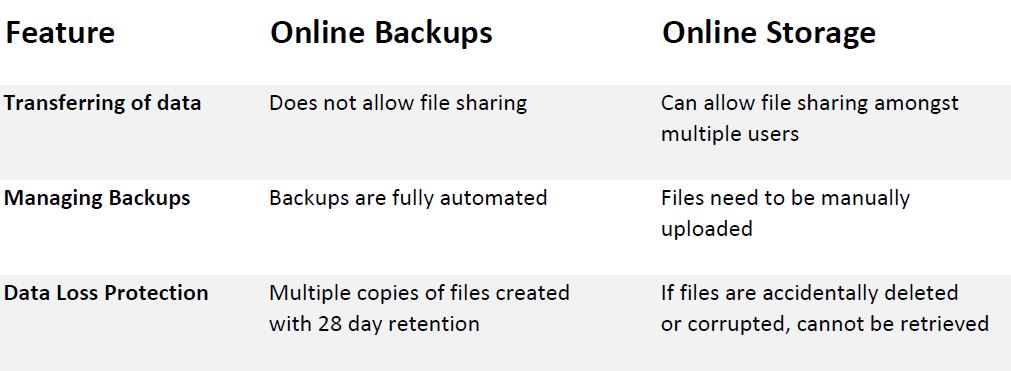
Here is a quick comparison
Online backup vs online storage comparison
Hopefully this has helped, it’s extremely important that you understand the differences between the two technologies and what your business requires. Many businesses like the ease of sharing files and having them available from anywhere, but it’s also advised that these files are also backed up using an online service.
We have helped many businesses avoid a possible data nightmare by implementing suitable procedures to ensure their data is kept safe and secure. If you don’t know or aren’t sure, contact us today. Our number is 0447 619 397 or you can send us an enquiry, either through our contact page, by Facebook or by email, helpme@ckpcomputers.com.au.
Backup Failure: How you can prevent it

There are two kinds of people in this world. Those who perform effective backups and then there are those who are meant to lose priceless, important information. Admit it or not you belong to one of these groups of people. If you belong to the first group, then that’s great news. If however you are in the second group, that’s bad news.
Maybe you’ve failed in properly handling your data backups or you may not be aware that this failure is a result of your inconsistency. Consistency is undeniably a necessity but if you don’t manage all aspects of backups, there is weak link and your backups will be harder for you to deal with. It’s possible you can face horrible and pricey expenses when you need them.
As a matter of fact, preventing backup failures is not always as easy as it seems, technology changes over time. New ideas, new concepts and new information require changes to be made to your backup routine.
Ideally, cloud backup is the way of the future. If however you still back up locally onsite and want to avoid backup failures, here are some tips to keep in mind.
  1. Media failure ranks as one of the main reasons why backups and restores fail, be it tape, USB or optical media. It is important to treat your backup media with respect and use it wisely. Rotating media regular and replacing old with new helps minimise failures.
  2. Human error is also considered as one of the prolific reasons of backup failure. The best protection against human error is to train those persons responsible to follow the best practices. Keep in mind that the persons who are going to implement backups and restores must fully understand what they should and shouldn’t do.
  3. Sometimes new software may also results to backup breakdown. Why? For instance, operating system and other program updates can make firewall changes which can affect network backups, causing them to stop working.
  4. Tape drives and other backup hardware may also fail. The causes of breakdowns for backup hardware are the same as any other kinds of hardware, yet there are some circumstances that are unique to these backup systems. An example is tape drift which causes a horrible type of failure in tape drives. As the drive ages, the heads begin to wander out of alignment. As a result, if you need to restore the tape on another drive, it will not be able to read the tape. The really scary part is that the drive passes verification as it can just read what it wrote.
  5. Backing up over a network is more effective as it removes unnecessary backup devices. However other issues such as network problems or a bad switch can cause backups to fail if they aren’t being monitored.
Thankfully these days we have technology known as cloud backup which reduces and almost eliminates the issues of yesteryear. It is still imperative that the correct data is being backed up and that test restores are done.
They say that if you do not test your backup, then you don’t have any backup at all. So, whatever the reason of your backup breakdown, the best thing to do is to verify or test it by performing regular test restores. Testing your backups regularly won’t totally prevent backup failures, but it will raise any problems that you wouldn’t have known about and allows you to fix the problem before it get worst.
If you are concerned about your data and if it’s being backed up properly, contact CKP Computers so we can check it out for you. Our number is 0447 619 397 or you can send us an enquiry, either through our contact page, by Facebook or by email, helpme@ckpcomputers.com.au.

Sunday, February 4, 2018

All About Computers: Solving the 21st Century Dilemma

The computer we know today started in the 19th century with Charles Babbage who is an English mathematics professor. He designed its analytical engine. And our computer’s framework today is based on this.
At these present times, computer technology has a lot of uses on a daily basis. It can be used to connect with people and serve them. Laptops, desktops and mobile devices connect the world together. We can perform multiple tasks at the same time and this lessens the amount of time we render to do some task. However, more than these machines the industry still involves government, communities, organizations, and individuals to rely on computer technology to innovate and produce.
The computer seems to be as necessary as our primary needs such as food, shelter, and clothing. It plays a huge role in us. And with our world, today depending on this technology we definitely need some professionals that can help us deal with this modern day technology on how to effectively use it and on how to fix its problems.

We do almost all our daily routine using this modern technology. We work fast and efficient because of these technologies. On the contrary, working with a dysfunctional computer and laptop will ruin our day and will greatly affect our overall performance in work and in business.

These computer professionals we can call are this computer technician or the computer consultant. A computer technician deals with the technical problems, whereas an IT/computer consultant deals with business problems through the computer technology.

Computer malfunctions come from a minor incorrect setting, viruses, and as far as replacing its hardware and the entire operating system. Some of these technicians can provide on-site services, usually at a rate. Others may also provide services off-site, wherein the client can leave their devices and computers off at the repair station. Some have the option of a pickup and drop off services for the customer convenience.

Every organization, every business has its different IT needs. Your business needs to address the evolving technology to keep up the pace with competitors and deliver more to your customers in a short period of time. Businesses nowadays must have an IT support that they can rely on for their business technicalities. Business IT support is essential so you can do the necessary technical work that will support business processes.

PC repairs, laptop repairs, and troubleshooting are some of the basic services a computer technician or a computer consultant can give you. They can also provide 24/7 health checks, daily safety checks, identifies issues early, monitoring & maintenance, remote & onsite support, phone support, system tray application, patch management, managed antivirus, managed web protection, managed cloud backup, network monitoring, printer monitoring, ups monitoring.


If you need some IT support you can visit https://www.ckpcomputers.com.au/. They can provide the highest quality customer service and IT products. They are encouraging long-term relationships with their customers. And they believe that all businesses should have an IT support they can count on. They can also do onsite computer repairs Melbourne and computer repairs Rowville.

Monday, January 22, 2018

Finding trustworthy Computer Repair in Melbourne


A computer is one of the best innovations that technology had ever made. You can’t deny the fact that it makes things easy for you. In just a click, it enables you to deliver and acquire information. You never noticed, but yes, computers play significant roles in your daily lives. 

But, computer problems are unavoidable. Sometimes, no matter how careful you are, time will come that it will malfunction and will cause you a lot of trouble.  

You might even think that having your computer checked by a professional repair technician will cost a lot of money. Most people have the same way of thinking as you are when it comes to computer repair. Just because you think that you can’t afford to avail professional repair, you tend to fix the problem by yourself. But sometimes, instead of fixing the problem, it only results in a bigger damage. Your attempt will just leave you frustrated. 

Once your computer has encountered a serious problem, the first thing you should do is to contact the best computer repair in your place. Never try to repair it by yourself, especially when you don’t know the cause of the problem. You must hire a computer technician to determine the problem. 

You can find computer repair companies anywhere. If you are living in Australia, specifically in the Melbourne area, you will find a lot of computer consultants anywhere in the place. They all have different expertise that will absolutely help you with your computer problems. The problem now is which computer repair company you will entrust your computer with. Most of them will claim that they are the best while the other will say the same. 

Finding the best computer repair or technicians in Melbourne can be a daunting task. But to help you find the one that is worthy of your trust and money, simply follow these tips:


1. Ask for certifications. Check on whatever certifications the computer repair company has. Ask them how long they have been in the industry. If they can’t show you any, never entrust your computer to them. Certification proves that they have a high-quality service.


2.Ask for their rates for a basic installation or upgrade service. Ask how much money it will cost for basic installation.  Never choose a company that asks for a charge higher than the usual hourly rate. If they overcharge for their basic services, they only mean that serious computer problems will cost a lot of money.


3. Make a research to check on your computer problem. If you have an idea of what happened to your computer, you can easily explain to the technician what happened before your computer malfunctioned. It will also help him determine the main cause of the problem.

Nowadays, a computer has become a necessity. It is already a need in every home, school, and businesses. You have to take care of your computer if you really want to enjoy the benefits of using it for a long period of time. Make sure to give it a regular cleaning and check up.


Tuesday, May 16, 2017

Network Solution Found!

We went and saw a client in Blackburn South who was trying to sort out a networking issue with a laser printer. Where the printer was located in the office was not ideal and he wished to move it to an alternative location; only trouble was, there were no hardwired network ports, nor did the printer have wireless capabilities – what to do?
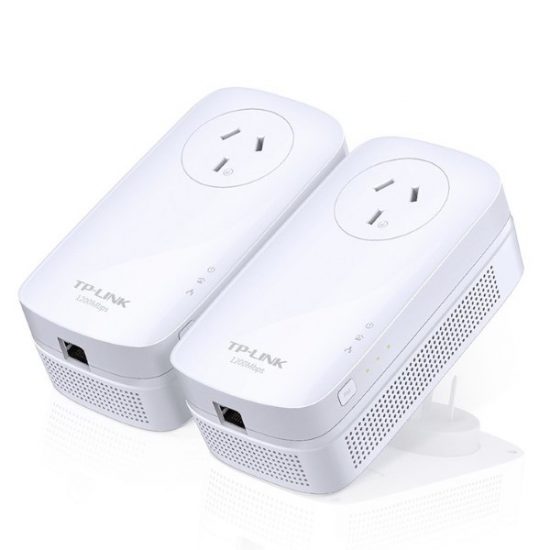
As the printer only had Ethernet (wired network) or USB connectivity, one option would be to get an electrician or cabler onsite to install a network cable to the new place where the printer would live; however, this is a costly exercise. An alternative way of connecting the printer is to use a couple of Ethernet over power line adapters!

powerline adapter

Using this technology is a great option when Wi-Fi or a cabled connection just aren’t possible or cost effective. The way it works is by using your existing 240v home/office electricity circuit to create a network link. The electrical wiring in your home or office transfers electricity at the Australian standard frequency of 50Hz (some other countries like the US use 60Hz) but is able to support a variety of frequencies other than this. Extra data is able to be sent along the same lines using higher frequencies; similarly to how ADSL is able to work over typical phone lines.
Once the adapters were connected, one on each end, everything just worked, quickly and easily without any time consuming configuration involved.
The customer was very happy, as we saved him time and money.
If you need help with a networking issue, we are here to help you. Our number is 0447 619 397 or you can send us an enquiry, either through our contact page, by Facebook or by email, helpme@ckpcomputers.com.au.

Sunday, May 14, 2017

Seven Steps to Help You Choose The Correct Laptop

While tablets & smartphones can do many simple everyday tasks while we are out & about, they are limited to what they can do. Heavy typing on a touch screen is not very practical and many applications are just not possible on a handheld device. A laptop is a much more versatile tool to get your work done, but which one do I choose?
Buying the right laptop can sometimes be a daunting task considering the variety of brands, sizes, features and prices. By knowing what your needs are, choosing can be made easier and following these steps will definitely help.

1. Decide on Platform – Windows, Mac OS or Chrome OS
Laptops come shipped with an operating system already installed, this allows you to ‘operate’ the ‘system’ if you will. Without it, the laptop won’t do much. Choosing the right one is generally a personal preference & most people tend to prefer one over the other. In business situations, sometimes you are forced to choose a particular platform if the software application required for work only functions on one platform, ie only Windows version available.
Most common is Windows 10 & Mac OS, but some of the inexpensive laptops or ‘Chromebooks’ use Chrome OS. Google’s OS is simple & similar to Windows by way of looks but is limited in supported applications. If you are just after a simple device with great battery life to do word processing, spreadsheet entry, web browsing or email, a Chromebook might suffice.

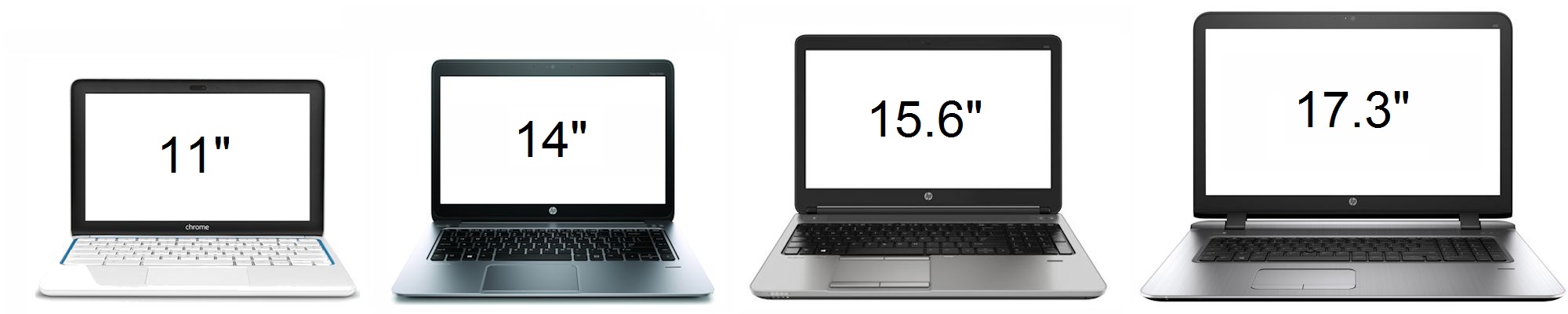
2. Choosing the right size
monitor-sizes
Next thing to decide is how big or small you need your laptop to be. It’s best to determine screen size before considering specs & other features. Sometimes you have to sacrifice one (portability or screen size) for the other.
These are the main sizes but some brands & models may differ slightly.
11.6” - You tend to find Chromebooks with this screen size, they are light and extremely portable. Battery life is also very good.
14” – Many of the business laptops, such as the HP Elitebook come in this size. They are very portable without sacrificing usability. They are light and offer good battery life.
15.6” - The most common size of laptop, they provide good usability while still being relatively portable. Downside is they tend to be heavier and battery life not as good.
17.3”+ – Also known as desktop replacements, these laptops have the largest screen while sacrificing portability. Great if your laptop sits on your desk all day. Many laptops this size also offer greater processing power compared to smaller screened laptops. Many people choose these to save space otherwise taken up with a desktop PC.

3. Check the specifications
Laptops have everything a regular desktop PC needs to operate, CPU, Ram, HDD being the main components.
CPU – The CPU or central processing unit is the ‘brains’ of the computer and it is important to make sure your laptop has the correct one depending on what work you are doing. For more info on CPU’s, please see our previous article.
RAM – Stands for Random Access Memory which is temporary memory the computer needs while in operation. The more the better generally, but most laptops come with 4-8Gb which is usually sufficient. The cheaper Chromebooks may only come with 2Gb whereas the larger powerhouses may have 16Gb.
Storage – Options include either a HDD (Hard disk drive) or an SSD (Solid state drive). Both have their pros & cons & more info about these can be found here. The majority of laptops only have provision for one drive due to space; the larger laptops may have the option of installing two or three drives in total.
Display – The higher the resolution of the screen, the sharper the image and the more information can be displayed. Most laptops have a resolution of 1366 x 768 but more & more are coming out with full HD 1080p displays with a 1920 x 1080 resolution. Some of the higher end desktop replacements may also have 4K displays (3840 x 2160).
Graphics – For most people an integrated graphics chip is sufficient for everyday laptop use. If you need a discrete graphics chip for 3D work or playing games, look for a model that provides AMD or Nvidia graphics to suit your requirements.
Optical drive – Fewer & fewer laptops are coming out with optical drives nowadays as the majority of software is now downloadable. If you do require an optical drive, buying an external USB drive might be better than sacrificing other more important features of the laptop.

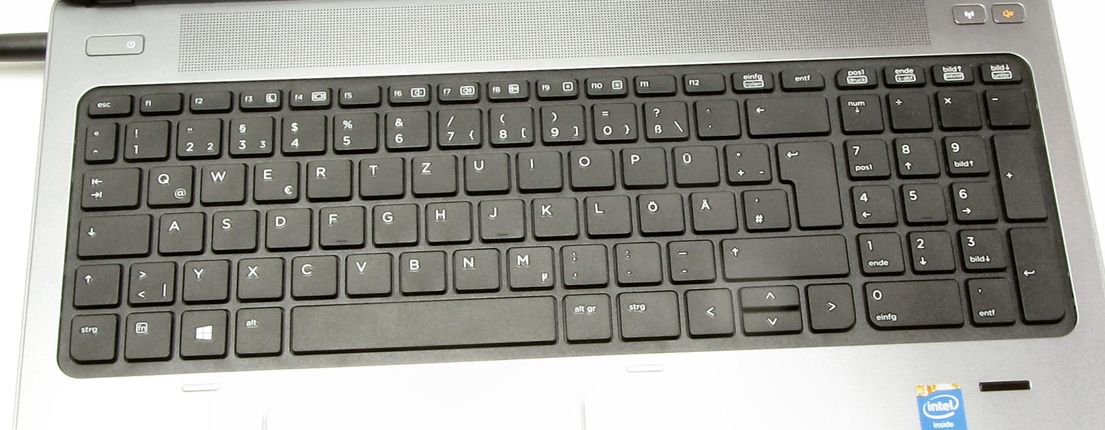
4. Check the Keyboard & Touchpad
keyboard-with-number-pad


Keyboard
 – If you do a lot of typing, the keyboard will be the most important aspect to consider. Smaller laptops have to compact the keys in order for the keyboard to fit and can feel cramped for some people. A number pad is also missing on smaller laptops due to limited space. It’s something to keep in mind if you do number entry as a number pad is essential. Many 15.6” laptops do now include a number pad as part of their keyboard, but many do not so it pays to double check if this is important to you.
touchpad-with-buttons touchpad-no-buttons nub
Touchpad – Touchpads can differ between laptops, some have the left & right mouse buttons as part of the touchpad while others have these buttons separated. Some business models also include a nub located on the keyboard which makes it handy to navigate without having to take your hands off the keyboard.

5. Battery
There are many factors which will determine how long the battery will last but generally you can expect anywhere between 3-4 hours from most laptops. The inexpensive Chromebooks can last a long time as the system doesn’t consume a lot of power in comparison to some of the higher end systems. Larger capacity batteries can sometimes be purchased which will extend the use time.

6. Budget
Once you know roughly what type of laptop you’re after, work out how much you’re able to spend and then see what options are available to you. You get what you pay for so if you can budget a little more, sometimes it will save you money in the long run by having a longer life cycle and allow you to be more productive.

7. Brand & Warranty
Support is very important especially if you’ll be using your laptop for business. It’s also imperative you check the type of warranty that it comes with. For minimal downtime, onsite support is paramount as a technician will come to your place. RTB or return to base warranty is where the unit has to be sent to a repair centre, maybe with a 1-2 week turnaround; something not very practical if your business relies on the laptop to operate.
Sometimes it’s possible that you won’t find the ‘perfect’ laptop for your needs and you may have to make a small compromise somewhere. Another thing to consider is that your ideal laptop may only a small upgrade away, like a RAM increase or to go from a HDD to an SSD to speed up the laptop more & increase the battery life.
Hopefully these seven steps will help next time you’re deciding on a laptop for work or pleasure. If you require any further help or you just aren’t sure, CKP Computers are always here to help you. Drop us a line on 0447 619 397 or you can send us an enquiry, either through our contact page, by Facebook or by email, helpme@ckpcomputers.com.au.