Showing posts with label computer consultant. Show all posts

Wednesday, November 21, 2018

How would you know if your computer needs to be repaired?

In this day and age we consider having computers to be a basic necessity, whether you are a business owner or a regular employee, there are many daily tasks that have to be done with a computer. It has been a significant part of our life to own a computer or a laptop to aid us in our daily tasks. They can be considered as important as having a car because you need it almost everywhere you go – at work or at home.
However, like cars, computers also need to be maintained and repaired. Depending on the problem, your computer may give you a warning that something is not right. You may have not recognized the warning or you may have neglected these signs. Sometimes you don’t get a warning at all, so how would you know if your computers need to be repaired?
Whether your computer is showing signs that it needs to be repaired or not, here are some things to consider:
  1. Physical damage - This is one of the most prominent signs that your computer needs technical attention. Damages such as a broken laptop LCD screen, cracked cases or other abnormal strange noises may signify that the unit has been physically mistreated. If the damage is just cosmetic, the unit may continue to operate without issue, other damage can sometimes lead to more serious technical issues later on.
  2. Running slowly - Slow performance of computers is generally caused by software but in some cases can also be caused by hardware. Other issues could be a lack of available memory or the storage drive is reaching capacity and needs to be cleaned out.
  3. Overheating - All computers have a built in cooling system that usually involves one or more fans that distributes the air throughout the case & central processing unit (CPU) to avoid overheating. However, there are some instances where the cooling system is not functioning properly, fan failure or dust build up can prevent adequate cooling and can lead to premature component failure.
  4. Error messages - If you are receiving error messages, then you must be a reason why. Ignoring messages can lead to bigger problems down the track so it’s best to get them fixed as soon as possible
  5. Infected with malware – Infections can effect computers to varying degrees. Some more minor infections can be detected easily and fixed by an anti-virus software solution. However, there are some viruses that can cause major problems to a computer which, in worst cases, renders them inoperable. 
These are just a few signs that your computer is in danger and needs to be attended to urgently.  Ignoring these warnings may cause severe problems or could even lead to unit replacement. Would you risk having to replace an entire PC due to not getting (what could be) a simple problem fixed?
If your computer needs urgent attention or would just like a service done, CKP Computers is here to help. Please don’t hesitate to give us a call, our number is 0447 619 397 or you can send us an enquiry, either through our contact page, by Facebook or by email, helpme@ckpcomputers.com.au.

Sunday, August 12, 2018

IT Support: Why There is No Room for Computer Problems Today


We are now at the golden age of technology. Nowadays, a computer is considered a basic necessity. It is a powerful device that makes our lives easier. It is also one of the most commonly used mediums worldwide for communication, creating artistic crafts, inputting information and a lot more. Businesses have arrived at an idea of having a paperless office. Thus, the need of efficient and user-friendly computers will is now considered even more important than ever.
There are things that come hand in hand with the trend that computers create. Such as the jobs for computer technicians, starting and building of computer repair shops, an online website that offers IT products and services, and the need for IT experts. Sometimes, these expert people are not tangible persons but an electronic one that can work for you and render services to your company even if they are far away from you. Those are the websites that you can access online. Taking care of your assets will definitely save you a lot of time and money especially if both are running low.
Here’s what an IT support can do for you:
           In businesses, the use computers are considered a mainstream. They are all fan of computers even before the golden era of technology. One of the most important services that a business must have is IT support services. The company should have IT people: a programmer to ensure that their website is always protected; a technician for the hardware maintenance of the computer; and a developer to keep their websites or applications updated.
           It is also important that these people are reliable. You hand them your company assets which is your computers, it must be given that these individuals are reliable at all times. They are the one who handles your clients’ database with confidential information. This is the critical information of the company. It is the golden book of the company so this must be taken care of properly and safely.
           These people are also the one in charge of making sure that all of your files are backed up properly. Files are the most important records of the company and so they must be handled carefully. Retrieving backed up data is very essential when you just had reformatting. IT experts are very good at that.
           Your computer system is one of your assets in your company. It is best that you ensure it is safe from suspicious viruses online. It can really harm your computer system. Computer viruses are getting strong from time to time so asking help from an IT support expert can be the best thing to do.
           Computers can also be useless at times. Without the internet, computers can only do the basics. Enhancing your internet connection and ensuring its speed is also a must thing to do. Your IT support is also the one you can call out for help. They can also ensure that only your company computers and other company portable devices can access your wireless network.
There are lots of common computer problems that only an IT expert can fix. It is necessary that your IT support is skilled and professional so that you can avoid any inconvenience because your computers are being maintained and taken care of. Sometimes when you try to fix your computer yourself, you can do more harm on it than actually repairing it. You can only make the problem worse and it will cost you time and money. Perhaps, an expert IT support service is an answer.
To ensure that everything in your computer system works properly, find out more about our services by visiting https://www.ckpcomputers.com.au.

Monday, July 16, 2018

Benefits of Managed IT Services for small businesses

“Why should I partner with an MSP (Managed Service Provider)?” That’s a question I get asked regularly. Some clients perceive that it would be more economical to stick with the traditional ‘break/fix’ model and to contact the provider only when an issue arises. It’s also a misconception that by being under an IT contract, that’s it’s a form of insurance and only in place if ‘The IT hits the fan’ as it were. In reality it’s the complete opposite.

Rethink IT

A Break/fix service fixes issues on an as-needed or ad hoc basis, which means if something goes wrong, you have to wait for a technician to come. This can result in loss of productivity and worst case; cause your business to grind to a halt while you wait for the problem to be fixed.
An MSP allows a business to delegate IT operations to a service provider. The MSP is responsible for the support and 24hr management & monitoring of the IT system and can address issues quickly should they arise.
Like large businesses, smaller businesses also require that their IT equipment is operating the best that it can. It’s very easy to get caught up with work and fail to keep up with things such as backups, security, updates, etc which can greatly increase the chances of an IT failure which could impact badly on your business.
For most cases, partnering with an MSP is more cost effective in the long run. Even if your business isn’t large enough to have dedicated IT staff, there is generally always a team member who is considered the ‘go-to person’ when a problem happens. Most likely because they may have some technical knowledge. However having an MSP allows that member to do the work they were employed to do instead of trying to fix computer problems.

Why having an IT service contract may be the best solution for your business

Simply put, an MSP proactively manages your technology. Small issues can be identified and rectified quickly and easily before they turn into big problems. An added benefit is that your team members will ultimately be more productive, which will save you time and money.
These days, no business can afford the downtime and uncertainty; having a reliable IT system is a must because your business depends on it. A proactively supported and maintained computer system will always operate better than one that isn’t. Once in place and tuned to run like a well oiled machine, you will notice a huge difference in the way you operate… and you will gain the benefits of preventing fires, rather than fighting them.

Cost?

Most of the time, having an MSP can be more cost effective than a break/fix solution, especially when you include the cost of downtime. Remote monitoring, maintenance and proactive support preventing major problems allowing the MSP to be more efficient and offer a better service than an alternative provider who is constantly visiting customers onsite.
By having an agreement based on the same flat monthly fee, it allows you to budget and keep costs in line. Depending on your business and what’s included in the contract, pricing is usually based on the number of servers or workstations and CKP Computers can tailor a package to suit your needs.
To sum up, here are some of the benefits you will see:
  • Increased efficiency and productivity
  • Proactive support to IT problems
  • Reduced operating costs
  • Cost-effective access to support
  • Better uptime with minimised downtime
  • Allow you to focus on your business and not the technology
  • Peace of mind knowing your system is monitored 24/7/365
  • Peace of mind knowing your data is safe and secure
  • Improved security
It’s also important to realise that a managed IT services contract offers preventative maintenance, it cannot provide prevention against failures. As with anything electronic, breakdowns can and do happen and no amount of preventative maintenance can avoid hardware failures (such as hard disk failures), data corruption, user errors (ie. intentional or not) or malware infections. Managed services is an assurance that if a major issue should occur, recovery from backups are possible and easily accessible while keeping any downtime to a minimum allowing you get back to business as quickly as possible.
Click here for more information on how CKP Computers can help you with your IT system. Our number is 0447 619 397 or you can send us an enquiry, either through our contact page, by Facebook or by email, helpme@ckpcomputers.com.au.

Cloud Computing: Secure Your Business

It is undeniable that every business needs good cloud services of some sort. Why? It is because the cloud helps manage business’ important workloads such as financials and its other important data. Choosing the right Cloud Services for your business needs could be a daunting task. Different variety of cloud services can be seen in the online market, there are countless advertisements say that their cloud solution is the best and that their cloud service is truly excellent. Maybe because of these you are confused what to choose and what to avoid. To help you find the best cloud services for your business keep this cloud explanation in your mind.
What is the ‘Cloud’?
Cloud computing or simply called as “the cloud” is a computing model that is use for the delivery of hosted services over the internet. It helps your business to store, manage and process data online.
Different types of Clouds
  1. Public Clouds- Is a publicly available cloud environment by a third party provider. With this type of cloud, a business share application software, hardware, data center and operating system with all the other users. Due to it, it is a very low-cost selection. You take advantage of the provider’s infrastructure which contributes to lower your capital expenditure and lessens the demands on the business IT section. Google, Amazon and Microsoft used the public cloud to give smaller companies a competitive advantage with inexpensive access to principal software and services that could not be unavailable. It is useful for a business because of its easy and inexpensive set-up and there are no wasted resources upon the use of this type of cloud because you only pay for what you used.
  2. Private Cloud- Unlike public cloud which share application with all other users, this type of cloud is owned by a single organization only. This type of cloud is best use by businesses with random computing needs that demands direct control over their environment. Private cloud provides higher security and privacy. Moreover, it has more control than public cloud. Since it is only accessible by a single organization, it has the ability to organize and handle it in line with their needs to attain a customized network solution. Private Cloud is also cost and energy efficient. It improves the share of resources within a business by ensuring that the accessibility of resources to individuals department can directly respond to their demand. Though it is not as cost effective as public cloud because of the smaller economies of scale and increased management costs, it is more effective in computing resource as it minimize the investment into unused capacity.
  3. Hybrid Model- It is said to be the best among the three types. It is a combination of two or more different cloud deployment models. This type of cloud is usually important for highly changeable workloads. In addition, hybrid clouds are usually implemented in the financial sector especially if immediacy is important and physical space is at a premium. Using this type of cloud can greatly facilitate connectivity in the workplace. Therefore, adoption of hybrid cloud can be an effective strategy for different types of businesses that have strict focus on security.
Using Cloud for your business will surely help you secure all the important information you have. But you must always keep in mind to choose the one in which you can save you money, time and effort. If you still have doubts about what type of Cloud to choose, CKP Computers can assist you to make up your mind. Our number is 0447 619 397 or you can send us an enquiry, either through our contact page, by Facebook or by email, helpme@ckpcomputers.com.au.

Differences between online backup & online storage

There seems to be some confusion over the differences between online storage & online (or cloud) backup and some initially consider them to be one of the same – they are not. They are vastly different and each serves a purpose, depending on how your business operates.
Online backup has been in existence well before storage options came about and as such can be viewed as an adaptation of the backup services by enabling file storage, access and sharing.
Curious to know more? Read on as we explain the differences so you can understand the two services.
What Is Online Backup?
Online backup secures your data and business continuity by automatically backing up your files and other important information to an offsite server to store them safely and securely for recovery in case of a disaster.
By disaster I mean anything that could cause you to lose precious information, such as a hardware failure, natural disaster (fire, flood), terrorism, vandalism or theft, accidental deletion, data corruption, malware infection, the list goes on…
Cloud backup solution
Online backups collect, compress, encrypt and then transfers the data to the servers of a cloud backup service. After the initial full backup, incremental backups are done to reduce the amount of bandwidth used. This also reduces the amount of time consumed in transferring files. CKP Computers backup solution also provides 28 day data retention, which means if you require a particular file version from two weeks ago, it can be retrieved without a problem.
Backing up your data via an online service ensures that you have multiple copies located in different places so if a disaster were to happen, a copy of the files will still be available to recover.
What Is Online Storage?
An adaptation of online backup, online storage allows easy access to files & sharing on many devices from anywhere.
Popular public cloud storage providers include:
These providers all have free accounts available which provide a limited amount of storage to use. For most people this is plenty, but if you need more, you will have to purchase additional storage.
cloud storage solution
Online storage provides in essence an online ‘drive’ where you can view, modify, share, and transfer files just as if it was local drive on your PC but with some added benefits. If you are sharing files with multiple users, they can access and modify the same file at the same time. This can be a big advantage for some businesses.
You can also sync existing folders on your local hard drive (eg Documents folder) with the online storage and whatever changes you make locally will also be replicated to the online storage.
By default, accessing these services is via a web browser, but they also provide small apps which you can install on your PC which makes accessing the files much easier.
Major Differences
Consideration for the following should be made when deciding on which service would best suit your business. Some can suffice with just one, others might need both for the ultimate in file protection.
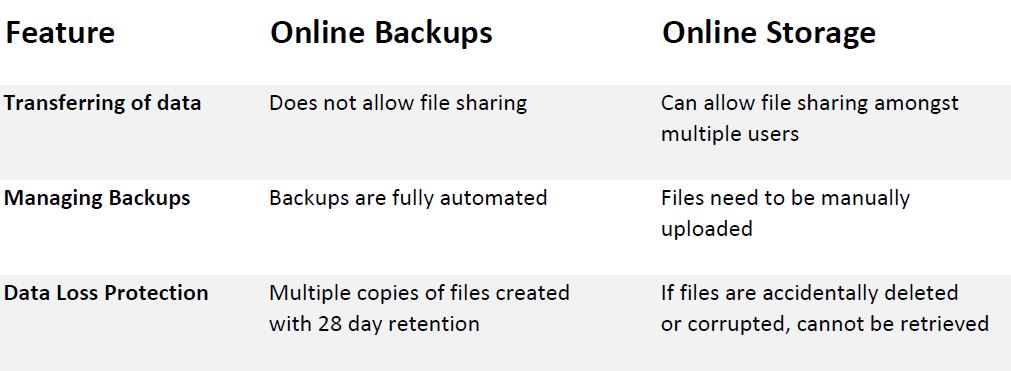
1. Transferring of files
As security is very important, online backup services provide high security as files are encrypted before they are uploaded to the offsite server, however it does not allow file sharing between users.
Online storage services allow you to upload and store files online and share them with others, however not all provide encryption and may not be as secure while files are being transferred.
2. Managing Backups
Online backup services can schedule jobs daily or as often as you need and is completely automated, you don’t need to do anything as it all happens in the background. With online storage services, you’ll have to manually upload files if you want a copy online.
3. Data Loss Protection
Online backups main purpose is to create an offsite copy which can be recovered in case of disaster. With onlince storage, as files are synced between devices, no redundant copies are created so if corruption occurs or files are accidentally deleted, you have nothing to recover from.
Here is a quick comparison
Online backup vs online storage comparison
Hopefully this has helped, it’s extremely important that you understand the differences between the two technologies and what your business requires. Many businesses like the ease of sharing files and having them available from anywhere, but it’s also advised that these files are also backed up using an online service.
We have helped many businesses avoid a possible data nightmare by implementing suitable procedures to ensure their data is kept safe and secure. If you don’t know or aren’t sure, contact us today. Our number is 0447 619 397 or you can send us an enquiry, either through our contact page, by Facebook or by email, helpme@ckpcomputers.com.au.
Backup Failure: How you can prevent it

There are two kinds of people in this world. Those who perform effective backups and then there are those who are meant to lose priceless, important information. Admit it or not you belong to one of these groups of people. If you belong to the first group, then that’s great news. If however you are in the second group, that’s bad news.
Maybe you’ve failed in properly handling your data backups or you may not be aware that this failure is a result of your inconsistency. Consistency is undeniably a necessity but if you don’t manage all aspects of backups, there is weak link and your backups will be harder for you to deal with. It’s possible you can face horrible and pricey expenses when you need them.
As a matter of fact, preventing backup failures is not always as easy as it seems, technology changes over time. New ideas, new concepts and new information require changes to be made to your backup routine.
Ideally, cloud backup is the way of the future. If however you still back up locally onsite and want to avoid backup failures, here are some tips to keep in mind.
  1. Media failure ranks as one of the main reasons why backups and restores fail, be it tape, USB or optical media. It is important to treat your backup media with respect and use it wisely. Rotating media regular and replacing old with new helps minimise failures.
  2. Human error is also considered as one of the prolific reasons of backup failure. The best protection against human error is to train those persons responsible to follow the best practices. Keep in mind that the persons who are going to implement backups and restores must fully understand what they should and shouldn’t do.
  3. Sometimes new software may also results to backup breakdown. Why? For instance, operating system and other program updates can make firewall changes which can affect network backups, causing them to stop working.
  4. Tape drives and other backup hardware may also fail. The causes of breakdowns for backup hardware are the same as any other kinds of hardware, yet there are some circumstances that are unique to these backup systems. An example is tape drift which causes a horrible type of failure in tape drives. As the drive ages, the heads begin to wander out of alignment. As a result, if you need to restore the tape on another drive, it will not be able to read the tape. The really scary part is that the drive passes verification as it can just read what it wrote.
  5. Backing up over a network is more effective as it removes unnecessary backup devices. However other issues such as network problems or a bad switch can cause backups to fail if they aren’t being monitored.
Thankfully these days we have technology known as cloud backup which reduces and almost eliminates the issues of yesteryear. It is still imperative that the correct data is being backed up and that test restores are done.
They say that if you do not test your backup, then you don’t have any backup at all. So, whatever the reason of your backup breakdown, the best thing to do is to verify or test it by performing regular test restores. Testing your backups regularly won’t totally prevent backup failures, but it will raise any problems that you wouldn’t have known about and allows you to fix the problem before it get worst.
If you are concerned about your data and if it’s being backed up properly, contact CKP Computers so we can check it out for you. Our number is 0447 619 397 or you can send us an enquiry, either through our contact page, by Facebook or by email, helpme@ckpcomputers.com.au.

Thursday, April 12, 2018

The Handy Works of a Computer Technician


Modern technology has introduced computers to our generation. Ever since its discovery, most of our works can be easily done. It is a device that most of the human population use. Computer is defined as a device which accepts information in the form of digitized data. It is an advanced electronic device that is designed to work with and manipulate information. And since computers also make mistakes, a computer technician will be necessary to fix its errors.

Who Are The Computer Technicians?

A computer repair technician is a person who repairs and maintains computers and servers. Their responsibility is to fix and take care the errors of your computers. Most of them are of course, graduates of computer related courses. They are the so called “experts” in all the computer aspect. Some of them work in a company and some work alone. They provide the help you need in terms of computer related matters.

When to call a computer technician?

Modern technology has introduced computers to our generation. Ever since its discovery, most of our works can be easily done. It is a device that most of the human population use. Computer is defined as a device which accepts information in the form of digitized data. It is an advanced electronic device that is designed to work with and manipulate information. And since computers also make mistakes, a computer technician will be necessary to fix its errors.

Who Are The Computer Technicians?

A computer repair technician is a person who repairs and maintains computers and servers. Their responsibility is to fix and take care the errors of your computers. Most of them are of course, graduates of computer related courses. They are the so called “experts” in all the computer aspect. Some of them work in a company and some work alone. They provide the help you need in terms of computer related matters.

When to call a computer technician?

It is important when to know when to call a computer technician. If the following happened to your computer, you need to contact a computer technician immediately.

  • Computer won’t turn on
  • Computer is running slow.
  • It keeps on restarting
  • Internet is running very slow
  • It takes forever to download files or images
  • Devices are not functioning properly like mouse, printer, keyboard
  • Computer freezes
  • Blue screen
  • Applications that won’t install
  • Applications that run very slow

What Are The Things That A Computer Technician Can Do?

The following are the things a technician could fix:

  • Building or configuring new hardware
  • Installing and updating software packages
  • Creating and maintaining computer networks.
  • Other specific matters a Computer Technician do...
  • System security solutions
  • Wired or wireless network configurations
  • Virus & spyware/malware prevention & removal
  • Data back-up & recovery solutions
  • Managed IT services & cloud backup solutions
  • Data recovery from corrupted hard drives/memory cards/phones & other storage devices
  • Internet installations & configurations
  • Email set-up
  • Data transfer from old to new computers
  • File server installation & configurations
  • Point of sale setups including cash registers, barcode scanners & docket printers

It is important to keep in mind that computers can only do such. They also have their limits, so if you are using one, make sure to take good care of it and use it well. One error can affect other parts of the computer which could be lead to a much bigger problem particularly if your work is computer related.  If you do not know what to do, avoid fixing it by yourself especially if you’re not an expert.

For laptop and pc repairs, you may want to look for a trusted company with expert, high quality and professional computer technicians. Remember, not all computer technicians are reliable. Risking such issues may cause more trouble and hassle for you. If you are looking for professional and trust worthy computer technicians, you may visit https://www.ckpcomputers.com.au/.


Sunday, March 4, 2018

Computer Technology: What is its significance for the people’s everyday life?


Computer technology is the one being the servant for the people who want to reach the modern world. Desktops, laptops, and other mobile devices systemize the world together and let them execute different kinds of operations at a time. This production includes more of it as a machine. Computers, as we saw them in our everyday life, can handle a big part on our growing economy. Almost all of the living individuals, developing communities, government and organizations rely on computer technology to produce or bring into being the majority of their wants and especially their needs in their lives, such as food, services, entertainment, activities, care, communication, education and transportation.
Starting on the foods production, most of the farmers use modernism in computer technology to establish the paramount instance to set plants, fertilize, harvest, sell and trade crops. The Internet put forwards weather and stock market reports in instantaneous, and its worldwide network of probable consumers is more extensive than local merchants. New technology or machinery, such as the production of purifying of water, uses basic computer programming practices to automate the care of natural world and harvests. Collections of vehicles give drivers more information when congregating crops and farmers can distinguish if plants are polluted or contaminated with fungal toxins. As people become aware of new technology, they can adapt their future methods.
Merchants serve their customers by using different kinds of inventions made by the technology and artificial intelligence of people. Computer technology includes any machines that receive commands and perform calculations or services accordingly. Different kinds of systems, created online or offline, helps a lot of customers for them to have ease in their everyday life. Computer Technology is created for the people who need it starting from the saving of money to the saving of lives of living things. People gain more access to personalized services through the Internet.
Computer Technology not only works for the people’s need but also for the people’s wants. Reservation is a great example of computer technology. Using different kinds of gadgets, the reservations or bookings for hotels is done in just clicks. No more queues and hassle moments. Most of the time, computer technology saves life. Computer technology is also applied in the hospitals for the health care needed by people. The best example for this is the people suffering with Dementia patients. Health care products made with technology like the GPS Bracelet helps a lot to detect the patients wherever they go.
Also, Computer Technology handles a big part for the communication of people. Social media is the main source of the communication made by people. People correspond with friends, family, acquaintances and business associates through social media, email, texting and instant messaging. Most of the time, a computer is a useful tool for advancing educationally in traditional and non-traditional ways. The basic functions of modern vehicles are controlled through computer chips and circuitry.
We all know that Computer plays an important role in our everyday life. Starting the world of technology, we, people, starts a new beginning that will lead to the improvement of each and every country.

Tuesday, February 13, 2018

CKP Computers: Your Partner in Solving Computer Issues.


The most convenient and less hassle way of merging your data and important files in one single location is through your computers. Nowadays, computer serves a major role in every life of modern people. In home, school and most especially on your workplaces, computer plays a dominant role.

Why is that so?  

If we need to communicate with our far-away relatives, we don’t need to travel miles, with the help of computers empowered by modern technology, everything is now made possible. Communication is now made easy through the use of computer.
In terms of securing files, you don’t need to bring lots of folders or any other materials to bring your things. If you have with you your computer, every file can be put and one thing great about it is that you don’t need to bring much things.
If you have meeting presentation, you can simply use some computer features to make your work more presentable and easy to present.
In every single work, you can always have with you your computes, whenever, wherever.

But sometimes, due to public demand, we cannot avoid some happenings that we are in need of pc repairs. What are the common issues that a computer faces?
1.    Your computer internal memory should be based on the expected use. If you are just going to use it at home or you will use it for business or large workplaces. Once internal memory of our pc becomes insufficient, there is a great chance that all of our files will collapse. That is the moment that you in need to get some help from computer consultant.

2.    Computers are prone from viruses and malware. We cannot avoid the fact that no matter how we secure our files, there will always threats of virus that can harm your important files. Once affected by virus, chances of corrupted files are very possible. If there were case like that, you need to consult with onsite computer repairs.

3.    Unexpected shut down, damaged parts and software issues. The above mention problems are very common most especially if your pc is in over-used status. If you will be dealing with that kind of situation, you need to deal with IT Support.

What are the easy ways on how to take good care of your computers?

1.    Get padded case protection to cover up your computer/laptop from external environment.

2.    Do not over-charge your computer/laptop.

3.    Install anti-virus to protect your software.

4.    Clean your computers. If you need to delete old files that are no longer important, then do it.

5.    Reformat your computer if it is already affected by viruses.

     Sometimes, no matter how we try to secure our computers, problems will arise. If you are not that familiar on how you are going to response with computer issues, computer expert personnel is always at your service.
  
CKP Computers aim to provide the highest quality of IT products and customer services. If you are having troubles with your computer, you can always rely on CKP Computers. In terms of business IT support, CKP can also help you manage it.
With CKP Computers, you can always expect highest possible solutions of IT services. To know more about you can check this out, https://www.ckpcomputers.com.au/.


Sunday, February 4, 2018

All About Computers: Solving the 21st Century Dilemma

The computer we know today started in the 19th century with Charles Babbage who is an English mathematics professor. He designed its analytical engine. And our computer’s framework today is based on this.
At these present times, computer technology has a lot of uses on a daily basis. It can be used to connect with people and serve them. Laptops, desktops and mobile devices connect the world together. We can perform multiple tasks at the same time and this lessens the amount of time we render to do some task. However, more than these machines the industry still involves government, communities, organizations, and individuals to rely on computer technology to innovate and produce.
The computer seems to be as necessary as our primary needs such as food, shelter, and clothing. It plays a huge role in us. And with our world, today depending on this technology we definitely need some professionals that can help us deal with this modern day technology on how to effectively use it and on how to fix its problems.

We do almost all our daily routine using this modern technology. We work fast and efficient because of these technologies. On the contrary, working with a dysfunctional computer and laptop will ruin our day and will greatly affect our overall performance in work and in business.

These computer professionals we can call are this computer technician or the computer consultant. A computer technician deals with the technical problems, whereas an IT/computer consultant deals with business problems through the computer technology.

Computer malfunctions come from a minor incorrect setting, viruses, and as far as replacing its hardware and the entire operating system. Some of these technicians can provide on-site services, usually at a rate. Others may also provide services off-site, wherein the client can leave their devices and computers off at the repair station. Some have the option of a pickup and drop off services for the customer convenience.

Every organization, every business has its different IT needs. Your business needs to address the evolving technology to keep up the pace with competitors and deliver more to your customers in a short period of time. Businesses nowadays must have an IT support that they can rely on for their business technicalities. Business IT support is essential so you can do the necessary technical work that will support business processes.

PC repairs, laptop repairs, and troubleshooting are some of the basic services a computer technician or a computer consultant can give you. They can also provide 24/7 health checks, daily safety checks, identifies issues early, monitoring & maintenance, remote & onsite support, phone support, system tray application, patch management, managed antivirus, managed web protection, managed cloud backup, network monitoring, printer monitoring, ups monitoring.


If you need some IT support you can visit https://www.ckpcomputers.com.au/. They can provide the highest quality customer service and IT products. They are encouraging long-term relationships with their customers. And they believe that all businesses should have an IT support they can count on. They can also do onsite computer repairs Melbourne and computer repairs Rowville.

Digital Times: Computer Consultant on the Go!

Buildings a business is a combination of so much hard work, money and detailed planning that’s why we want them to be protected as much as can be. Businessmen hire security personnel to protect the area and the people around it.  But how can we protect our business online? It is through managed IT services.

Your Business’ Computer

It is a device that accepts information in a digitized form of data. This is an advanced electronic device that is made to work such information and manipulate. Computers have become essential in these modern days because they are fast and accurate. You can accomplish or do many tasks using it. This technology helps people in so many different fields such as communication, industries, banks, media, travel, education, and many other kinds of business. Computer technology is frequently used to connect and serve people in this modern world, but will happen when suddenly your laptop or computer started to have some problems and does not function properly anymore?

Importance of Protecting IT Equipment for Business

Your IT equipment in business is your personal property so it must be protected. If you lost your business personal property due to theft or calamity it can result in lost opportunity costs because you have to replace it. Your IT equipment includes items such as computers, phones, and other devices are a part of your business. Lacking control strategies may lead to unwanted results.

Everyone will agree that owners of small businesses have enough things to worry about, and worrying about their IT equipment as well. But in today you don’t have to worry about your IT equipment alone because we have now what we call computer consultants.

Computer Consultants

Computer consultant’s job involves data, programming, and analysis. They analyze computer systems, data, security, and software. These consultants will help you with your computer system so you can focus on more important things, like your customers, products and running your business, leading to productivity.

They can do onsite computer repairs so it will be convenient for you or you can also drop off your equipment on their sites if you may wish.

For a small monthly investment, they will assess your situation; will tailor a package that perfectly suits your requirements and preferences to help your business. With this, you can have time to rest knowing your equipment will be proactively supported and monitored.

IT consultants can handle desktops, servers, laptops, printers, and many more. It is important to monitor these devices so that if any issue arises it can be dealt it quickly before it becomes a major issue. Without an active monitoring cause big trouble when left undetected.

Factors to Consider In Looking for a Computer Consultant

1.  Reputation

With your firm, make sure that you check the reputation of your hired personnel as well as your computer consultant.

2. Knowledge and experience

Consider certifications and education as factors that can validate a consultant is eager and willing to learn more to help you. You also have to consider a consultant who’s a member of a professional organization. This membership indicates that they want to maintain and increase their education.

3. Organization

You will have to assess the organization. Consider their mission statement and code of ethics. Timely availability is important to most assignments. Its Web site can tell you about their employees and the firm’s background. It can also tell you their expertise and services they offer. 


Here’s a website you can check with all your IT equipment worries, https://www.ckpcomputers.com.au/. They also offer computer repairs Melbourne and it supports Melbourne. Just check them out.