Sunday, February 4, 2018

All About Computers: Solving the 21st Century Dilemma

The computer we know today started in the 19th century with Charles Babbage who is an English mathematics professor. He designed its analytical engine. And our computer’s framework today is based on this.
At these present times, computer technology has a lot of uses on a daily basis. It can be used to connect with people and serve them. Laptops, desktops and mobile devices connect the world together. We can perform multiple tasks at the same time and this lessens the amount of time we render to do some task. However, more than these machines the industry still involves government, communities, organizations, and individuals to rely on computer technology to innovate and produce.
The computer seems to be as necessary as our primary needs such as food, shelter, and clothing. It plays a huge role in us. And with our world, today depending on this technology we definitely need some professionals that can help us deal with this modern day technology on how to effectively use it and on how to fix its problems.

We do almost all our daily routine using this modern technology. We work fast and efficient because of these technologies. On the contrary, working with a dysfunctional computer and laptop will ruin our day and will greatly affect our overall performance in work and in business.

These computer professionals we can call are this computer technician or the computer consultant. A computer technician deals with the technical problems, whereas an IT/computer consultant deals with business problems through the computer technology.

Computer malfunctions come from a minor incorrect setting, viruses, and as far as replacing its hardware and the entire operating system. Some of these technicians can provide on-site services, usually at a rate. Others may also provide services off-site, wherein the client can leave their devices and computers off at the repair station. Some have the option of a pickup and drop off services for the customer convenience.

Every organization, every business has its different IT needs. Your business needs to address the evolving technology to keep up the pace with competitors and deliver more to your customers in a short period of time. Businesses nowadays must have an IT support that they can rely on for their business technicalities. Business IT support is essential so you can do the necessary technical work that will support business processes.

PC repairs, laptop repairs, and troubleshooting are some of the basic services a computer technician or a computer consultant can give you. They can also provide 24/7 health checks, daily safety checks, identifies issues early, monitoring & maintenance, remote & onsite support, phone support, system tray application, patch management, managed antivirus, managed web protection, managed cloud backup, network monitoring, printer monitoring, ups monitoring.


If you need some IT support you can visit https://www.ckpcomputers.com.au/. They can provide the highest quality customer service and IT products. They are encouraging long-term relationships with their customers. And they believe that all businesses should have an IT support they can count on. They can also do onsite computer repairs Melbourne and computer repairs Rowville.

Digital Times: Computer Consultant on the Go!

Buildings a business is a combination of so much hard work, money and detailed planning that’s why we want them to be protected as much as can be. Businessmen hire security personnel to protect the area and the people around it.  But how can we protect our business online? It is through managed IT services.

Your Business’ Computer

It is a device that accepts information in a digitized form of data. This is an advanced electronic device that is made to work such information and manipulate. Computers have become essential in these modern days because they are fast and accurate. You can accomplish or do many tasks using it. This technology helps people in so many different fields such as communication, industries, banks, media, travel, education, and many other kinds of business. Computer technology is frequently used to connect and serve people in this modern world, but will happen when suddenly your laptop or computer started to have some problems and does not function properly anymore?

Importance of Protecting IT Equipment for Business

Your IT equipment in business is your personal property so it must be protected. If you lost your business personal property due to theft or calamity it can result in lost opportunity costs because you have to replace it. Your IT equipment includes items such as computers, phones, and other devices are a part of your business. Lacking control strategies may lead to unwanted results.

Everyone will agree that owners of small businesses have enough things to worry about, and worrying about their IT equipment as well. But in today you don’t have to worry about your IT equipment alone because we have now what we call computer consultants.

Computer Consultants

Computer consultant’s job involves data, programming, and analysis. They analyze computer systems, data, security, and software. These consultants will help you with your computer system so you can focus on more important things, like your customers, products and running your business, leading to productivity.

They can do onsite computer repairs so it will be convenient for you or you can also drop off your equipment on their sites if you may wish.

For a small monthly investment, they will assess your situation; will tailor a package that perfectly suits your requirements and preferences to help your business. With this, you can have time to rest knowing your equipment will be proactively supported and monitored.

IT consultants can handle desktops, servers, laptops, printers, and many more. It is important to monitor these devices so that if any issue arises it can be dealt it quickly before it becomes a major issue. Without an active monitoring cause big trouble when left undetected.

Factors to Consider In Looking for a Computer Consultant

1.  Reputation

With your firm, make sure that you check the reputation of your hired personnel as well as your computer consultant.

2. Knowledge and experience

Consider certifications and education as factors that can validate a consultant is eager and willing to learn more to help you. You also have to consider a consultant who’s a member of a professional organization. This membership indicates that they want to maintain and increase their education.

3. Organization

You will have to assess the organization. Consider their mission statement and code of ethics. Timely availability is important to most assignments. Its Web site can tell you about their employees and the firm’s background. It can also tell you their expertise and services they offer. 


Here’s a website you can check with all your IT equipment worries, https://www.ckpcomputers.com.au/. They also offer computer repairs Melbourne and it supports Melbourne. Just check them out. 

Monday, January 22, 2018

Finding trustworthy Computer Repair in Melbourne


A computer is one of the best innovations that technology had ever made. You can’t deny the fact that it makes things easy for you. In just a click, it enables you to deliver and acquire information. You never noticed, but yes, computers play significant roles in your daily lives. 

But, computer problems are unavoidable. Sometimes, no matter how careful you are, time will come that it will malfunction and will cause you a lot of trouble.  

You might even think that having your computer checked by a professional repair technician will cost a lot of money. Most people have the same way of thinking as you are when it comes to computer repair. Just because you think that you can’t afford to avail professional repair, you tend to fix the problem by yourself. But sometimes, instead of fixing the problem, it only results in a bigger damage. Your attempt will just leave you frustrated. 

Once your computer has encountered a serious problem, the first thing you should do is to contact the best computer repair in your place. Never try to repair it by yourself, especially when you don’t know the cause of the problem. You must hire a computer technician to determine the problem. 

You can find computer repair companies anywhere. If you are living in Australia, specifically in the Melbourne area, you will find a lot of computer consultants anywhere in the place. They all have different expertise that will absolutely help you with your computer problems. The problem now is which computer repair company you will entrust your computer with. Most of them will claim that they are the best while the other will say the same. 

Finding the best computer repair or technicians in Melbourne can be a daunting task. But to help you find the one that is worthy of your trust and money, simply follow these tips:


1. Ask for certifications. Check on whatever certifications the computer repair company has. Ask them how long they have been in the industry. If they can’t show you any, never entrust your computer to them. Certification proves that they have a high-quality service.


2.Ask for their rates for a basic installation or upgrade service. Ask how much money it will cost for basic installation.  Never choose a company that asks for a charge higher than the usual hourly rate. If they overcharge for their basic services, they only mean that serious computer problems will cost a lot of money.


3. Make a research to check on your computer problem. If you have an idea of what happened to your computer, you can easily explain to the technician what happened before your computer malfunctioned. It will also help him determine the main cause of the problem.

Nowadays, a computer has become a necessity. It is already a need in every home, school, and businesses. You have to take care of your computer if you really want to enjoy the benefits of using it for a long period of time. Make sure to give it a regular cleaning and check up.


Wednesday, August 23, 2017

IT support services: Why it’s essential in your business?

Computer. By definition is a device which accepts information in the form of digitized data. It is an advanced electronic device that is designed to work with and manipulate information. Computers have become essential these days because they’re fast, accurate and can accomplish or do many tasks. They help people in many different fields such as banks, communication industries, education, media, travel or any other kind of business you may have. Computer technology is used to serve and connect people in the modern world, but what happens when suddenly your computer starts having problems and doesn’t function properly anymore?
Just think, you’re in the middle of doing something, and then suddenly you’re computer starts acting strange. You might think there’s something wrong with the hardware or software but you’re not sure. The majority of the time investing in a reliable IT support person will save you time and heartache.
Here are just some examples of common computer problems:
  1. Computer won’t turn on
  2. Computer is running slow.
  3. It keeps on restarting
  4. Internet is running very slow
  5. It takes forever to download files or images
  6. Devices are not functioning properly like mouse, printer, keyboard
  7. Computer freezes
  8. Blue screen
  9. Applications that won’t install
  10. Applications that run very slow
These are just some of the computer problems that you might experience. Just be aware that sometimes you may be inclined to fix certain issues yourself. A little knowledge can be dangerous and can potentially create a much bigger problem than it was initially, which ultimately takes longer to rectify. Don’t waste your busy time in thinking and managing the problem by yourself. Not all computer problems will be solved by searching through Google. It is not a sin to get some help from professionals and you will see that it can save you so much time, effort and most of all money.

Why do you need reliable IT support?

It is absolutely necessary that computers must be serviced in a regular basis to avoid any unnecessary interruptions. This is why you need an expert to do the maintenance for your computer. These are some reasons why there is a need for professional assistance.
  • Trained and more experienced computer technicians can figure out exactly what’s wrong with your computer.
  • Provide preventative maintenance to avoid potentially bigger issues down the track. Can also clean out dust and dirt preventing overheating and increasing the components lifespan.
  • Hiring a professional is also the best way to ensure your files are backed up properly. They can help you retrieve data and important documents whenever your computer needs reformatting.
  • Your computer system is one of the most important tools in your business. If you want your business to continue running, it’s wise to seek help whenever you suspect there may be an issue.
  • It can save you money. Just imagine, if you are a team member, appointed to fix the computer without really knowing the right solution, you might just make the scenario worse and it will cost you more in time and money. Computer technicians have the right tools, knowledge and experience to do the job right.
Many people use computers to do different tasks each day. In case of any system malfunction that you experience, don’t hesitate to give us a call. At CKP Computers, our number is 0447 619 397 or you can send us an enquiry, either through our contact page, by Facebook or by email, helpme@ckpcomputers.com.au.

Sunday, June 25, 2017

What is an SSD and how can it help me? - CKP Computers

I made a presentation the other day to a group of local business owners, it went really well so in response to that, here is the same information slightly condensed so everyone can benefit.
The topic today is “What is an SSD and how can it help me?”
You may have heard people talking about this but haven’t really given it much thought as to how you can take advantage of this rather new and exciting technology. What is an SSD and what does it do? How can it help me?
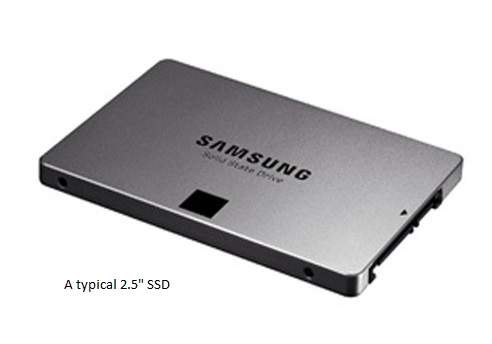
SSD is an acronym for Solid State Drive. It is a storage device that is required by a computer to store data, like the operating system (ie Windows), programs, documents, pictures, that sort of thing. I’ll also explain SSDs in another way, I’m sure everyone is familiar with the humble USB memory sticks, am I right? SSDs in a broad sense are very similar to a USB memory stick, but are far more sophisticated. They have no moving parts and information is stored in microchips.
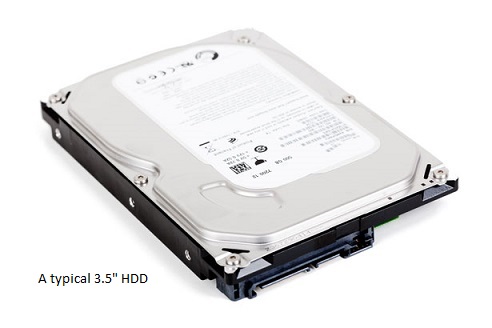
The main benefit SSDs have over other forms of storage is speed. If you compare them to the traditional hard drive (or HDD), a HDD uses a mechanical arm with a read/write head to access the information from wherever it’s located on a storage platter. It’s the time it takes for the HDD to find this data that makes them much slower in comparison; it simply requires more physical labour (mechanical movement) to retrieve the information.
A typical SSD uses NAND-based flash memory, which is a non-volatile type of memory. What does non-volatile mean, I hear you ask? The simple answer is that whenever the drive looses power it won’t ‘forget’ what’s stored on it. This is essential otherwise the computer would have to be permanently powered on forever, not really practical is it? As a comparison, the RAM or system memory your computer uses is a form of volatile memory, whatever is stored in RAM is lost when power is interrupted. In this case, it’s perfectly acceptable and is by design.
SSDs have come a long way since they were first pioneered, they are able to be read and written to all day long and the data storage integrity will be maintained for many many years.
An SSD relies on an embedded controller processor for the drive to function. The controller is a very important factor in determining the speed of the SSD. There are a number of controller choices that manufacturers could use in their drives and having the right controller is often what separates an excellent SSD from a good one.
Sounds exciting right? I won’t go too much into the working of the traditional HDD, I’m sure we are all familiar; after all, they have been around for nearly sixty years. Yes, you read correctly; IBM introduced the first HDD back in 1956! We’re talking about sixty year old technology, although to give some credit, the technology has been refined over the years.
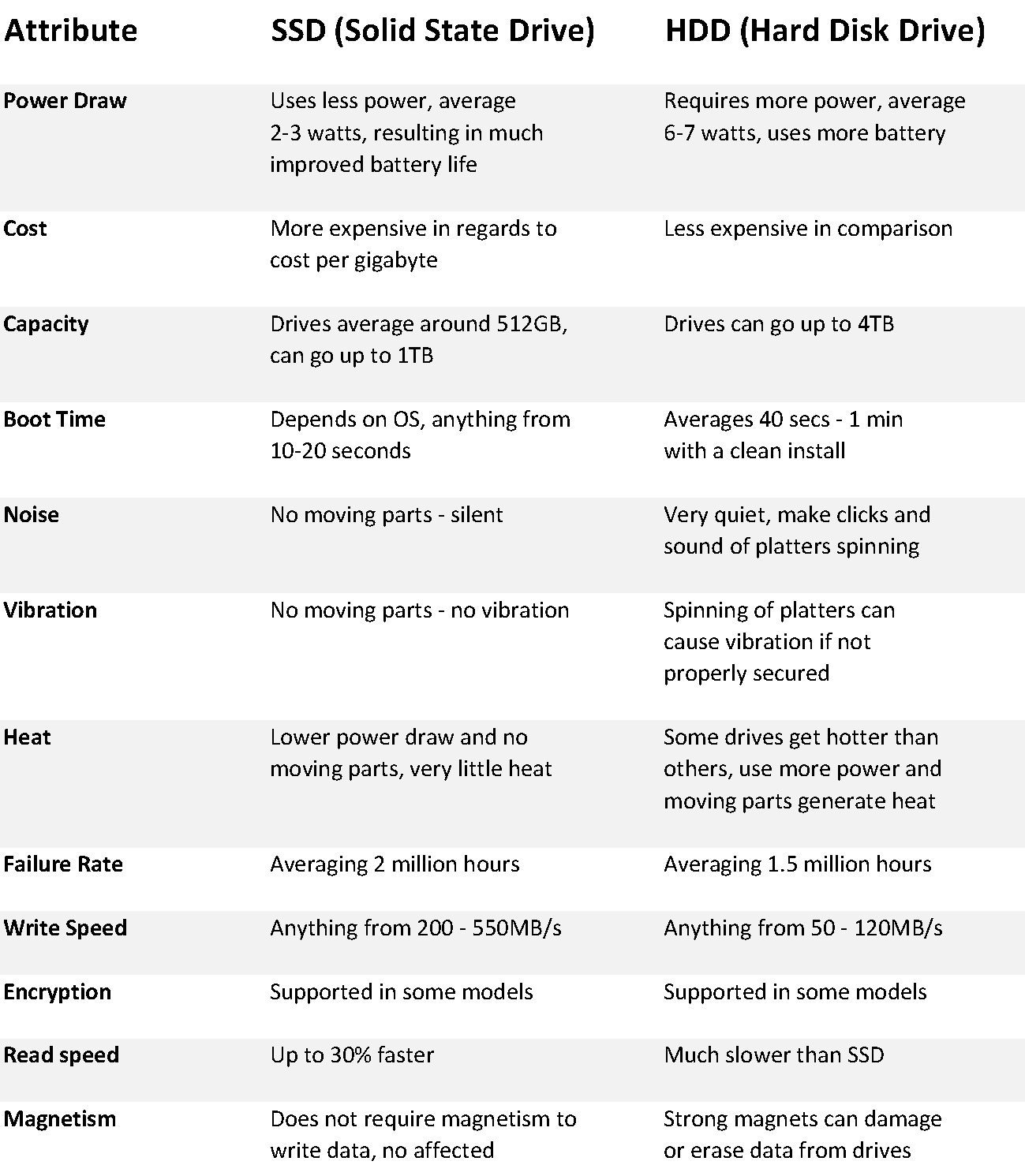
The pros & cons of each are listed in the table below.
Chart
As you can see, there are many benefits of an SSD over a HDD but it doesn’t automatically make them a better option. SSDs a still a relatively new form of storage and have a little while to catch up. Right now however, HDDs have the upper hand by offering more storage space for less cost. You may still be asking yourself, which drive is right for me?
SSD
An SSD would be the right choice if:
  • You are prepared to pay more for better performance
  • Not concerned with having limited storage capacity or can work around it
HDD
A HDD would be the right choice if:
  • You need lots of storage capacity, up to 4TB for a single drive
  • You don’t want to spend much money
  • Not concerned about performance
HDDs are still a popular choice, most average consumers typically choose a HDD as the storage option in their new computer mainly due to cost. However, as SSD prices continue to fall, more and more consumers are considering these drives as an upgrade, this is a great way to get a more life out of an old laptop that may be a few years old. As they say, a computer is only as fast as its slowest component and for many years, the HDD has always been the bottleneck. At CKP Computers, we specialise in the highest quality components, computer repairs & service, so let us help you by installing a new SSD in your existing laptop. It will unleash a new lease of life to a slow and otherwise unproductive laptop, make your battery last longer and you can also possibly avoid the high cost of purchasing a new laptop prematurely.
When it comes to desktop computers, the ideal situation is to have both; an SSD which has the operating system and software applications installed on it in addition to a large multi GB HDD which is used purely for data storage (documents, photos, etc). Of course this is only possible in systems that have the provision of housing multiple storage devices.
If you would like more information on SSDs, please contact us today on 0447 619 397 or send us an enquiry, either through our contact page, by Facebook or by email, helpme@ckpcomputers.com.au.

What is the difference between Viruses, Spyware, Malware & Adware? - CKP Computers

malware
What are viruses? What is spyware? I get asked this fairly often and sometimes it can be difficult to understand the differences between the types of computer infections, so this will be our topic for today.
What is the difference between Viruses, Spyware, Malware & Adware?
There’s nothing worse than turning on your PC and be delightfully greeted (sarcasm) with unwanted content popping up on your monitor. No matter what you do, it won’t go away and in some cases can severely bog down a system or render it completely unusable.
For starters, I’ll list the different types of infections and then highlight measures you can take to avoid becoming a victim. There are many variations of each type and sometimes can be a combination, but here is a brief rundown of each, so you’ll have a better understanding if the worst happens.
Viruses – A virus is a self replicating program that is designed to do damage. They are potentially the most serious out of all the infections a PC can get. Once executed (opened), viruses copy themselves into other programs, data files or onto the boot sector of the hard drive itself. Viruses have the possibility to access personal information, email contact list or corrupt programs. They are installed without the knowledge or consent of the user from an infected file or by being downloaded automatically when a user accesses an infected website.
As an example of the damage a virus can do, a particularly bad virus was doing the rounds a fair few years ago, (the name of it escapes me unfortunately) what it did was on a certain day of the month it would completely erase the system’s hard drive which meant losing everything that wasn’t backed up. Not only that, it would also completely erase the motherboard BIOS chip, which effectively renders the computer useless. The only repair options were to replace the BIOS chip (if possible) or replacement of the entire motherboard and then have the system software reinstalled. Not a cheap fix by any means. Thankfully this particular virus is seldom seen nowadays.
Spyware – As the name suggests, software that spies on you or your browsing habits. Spyware collects personal information about the user which is then sent to another entity without consent. Some spyware can also give hackers the ability to access the computer remotely. There are a number of different spyware types, one example is a key logger, which can record every key press a user makes and with that information, hackers can determine usernames and passwords for websites, bank logins particularly.
Malware – Short for malicious software, malware can be thought of a collective term which can include viruses, spyware and any other combination of the above. Any software that is malicious in nature is malware.
Adware – Most often than not, adware doesn’t do any damage to a PC, but can be used as a vehicle which can allow more serious infections to occur. Adware is considered to be an irritant by many, which results in popup windows opening randomly but otherwise not causing any other issues to the computer. These popup windows can show different information and usually contain links, which if clicked on can cause more problems by allowing viruses or other malware to be installed. In recent times and the advent of online scams, much of the adware these days are used to syphon unsuspecting users of their hard earned cash, example are:
“Your computer is infected, click here, pay x amount to clean your computer” or “Your PC is running slow, click here to fix”. Of course there can by any number of variations of these, but I’m sure you get the idea. Keep in mind though, if you ever get a window which wants you to pay, more often than not, it’s a scam.
Scary isn’t it? It definitely can be. For a minimal investment, allow CKP Computers to install reputable security software as the alternative could be far more costly. In order to protect yourself it is always advisable to have current up-to-date security software which monitors your system. It’s no use having security software that’s expired or out-of-date because it’s simply not doing the job. At the very least, there are a number of free alternatives (Avast, AVG) that can be used. Having free security software, whilst not being as comprehensive as the paid for options is still far better than having nothing at all!
If you’re concerned about your system, require security software or would like more information, please contact us today on 0447 619 397 or send us an enquiry, either through our contact page, by Facebook or by email, helpme@ckpcomputers.com.au.

How dust and dirt can cause a build up of gunk on your computer's heatsink - CKP Computers

I gave an education talk the other day about the importance of maintaining your PC or laptop and how dust and dirt can seriously cause major problems if not rectified.
First things first, if you don’t have the confidence to do the job yourself, you could make the problem worse and damage your computer (or yourself). Use an anti-static strap to avoid static discharge. If you are not confident, please consult the professionals.
CPU’s (Central Processing Units) are the main brain of a computer and they can produce a lot of heat. To dissipate that heat, a heat sink and fan are required to keep the CPU running cool. There are other ways of keeping the CPU cool (water cooling, etc), but I won’t go into those methods.
Desktops – There are many varieties of heatsink fan (or HSF’s) available but for the purpose of this blog entry, I’ll talk about the most common type. They work by having a fan blow air onto the heatsink and through the fins out the side of the heatsink to get dissipate the heat. This process works extremely well as a way of reducing the heat the CPU produces.
deskhsf
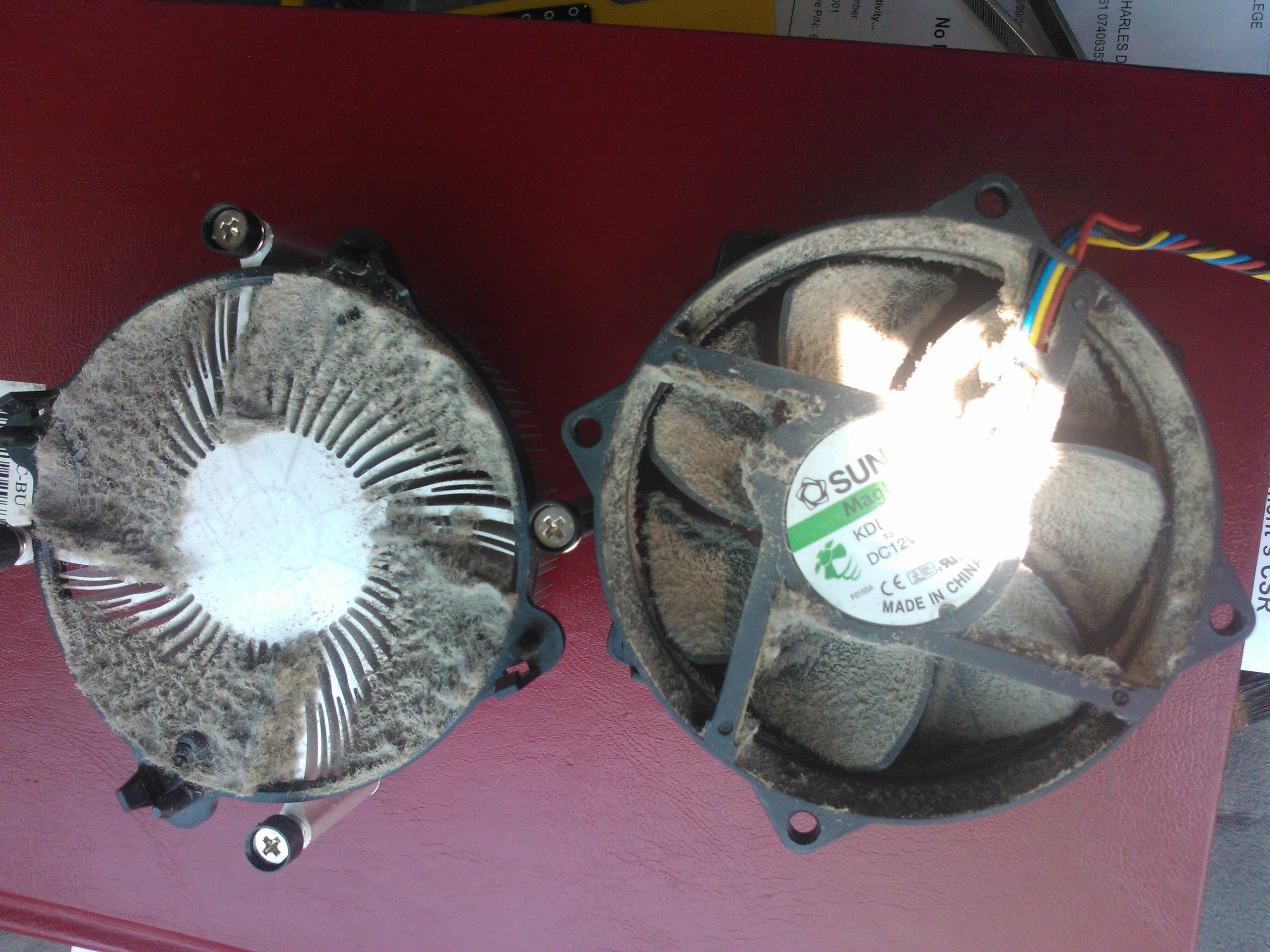
The biggest problem is that over time, dust, dirt, hair and other particles that get carried around in the air get blown onto the heatsink and eventually cause a blockage, a mat of dust in actual fact. When this happens, the fan is blowing air, but due to the dust covering the heatsink, the air has nowhere to go and everything overheats.
dirty
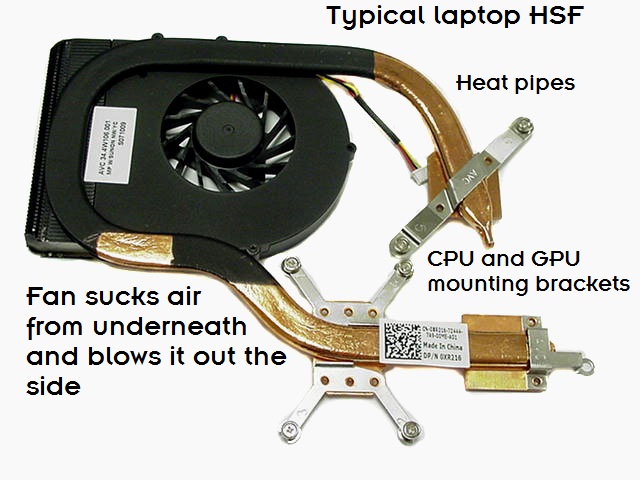
Laptops – HSF’s for laptops work in a similar manner, but due to space constraints, the design is different but fundamentally they work the same. They vary in shape and size, depending on the laptop specifications and are usually designed to remove heat from the graphics processing unit as well as the CPU. Heat pipes are often used (copper tubes) to transfer the heat to the fins so it can be easily dissipated. Air gets sucked in from underneath, which then passes through the fins and blown out the side of the laptop.
laphsf
Same problems can occur as with the desktop configuration. Dust can cause blockages which leads to overheating. Major difference however is that getting access to the fan in a laptop requires a lot more work. More than likely, complete disassembly is required. This is not recommended unless you know what you are doing.
Typically, most of us don’t check our computers every day for dust build up, but a clean out every six to twelve months (depending on environment) is a good way to keep your system running smoothly.
When the problem gets really bad, there are a number of warning signs to let you know something is wrong.
• The fan speed increases to very loud levels. When the CPU is not adequately cooled, the system board senses this and makes the fan spin faster to try and compensate and cool the CPU.
• The computer or laptop is hotter to the touch. Sometimes so hot it can actually do damage to surrounding components. Heat is not good.
• The system runs very slowly. Some CPU’s when hot, shut down areas within the processor in an attempt to reduce the heat. The CPU is not running at it’s full potential which causes the slowness.
• Worst case scenario, the CPU gets so hot it shuts itself down to prevent damage to itself. An audible beeping from the mainboard is usually heard and the computer turns off.
I have heard of fires starting due to overheating computers, so it’s very important that it’s maintained and kept running as cool as possible. As an added bonus, having a clean computer will also increase the life span of the hardware and it will last you much longer.
Cleaning – As always, prevention is better than cure. For desktops, one way to prevent a constant build up of dust and dirt is to have dust filters installed on all the intake case fans so the air that is within the case is always clean. Location of the PC is also important. Up off the ground and away from carpet and other sources of dust are also recommended.
For laptops, using the device on a clean hard surface is recommended to keep them as clean as possible. Due to the way laptops are designed (suck air in from underneath), it is not recommended to use them on carpet, in the bed or on any other like surface.
I don’t recommend using a vacuum cleaner as it can cause static damage to the electronic components. Manual cleaning with a brush is the only truly safe way to effectively remove all the dirt build up. For desktop computers, it’s usually just a simple matter of removing the side of the case and you have easy access to the heatsink and fan. Laptops however usually involve complete disassembly and require more time and technical know how.
If you think your computer is not running as well as it used to or it sounds like a jet aircraft, please contact us before the worst happens. Our number is 0447 619 397 or you can send us an enquiry, either through our contact page, by Facebook or by email, helpme@ckpcomputers.com.au.